I'm making this guide not only due to a lack of educational resources for chiptune, but also due to the fact that it is much easier to correct a written guide as opposed to a video guide. If anyone reading this would like to make a video detailing the information in this guide that would be awesome! You don't even need to credit me (although it would be nice).
Most of the techniques in this guide will be from the perspective of Famitracker since that's what I have the most experience with, most techniques should carry over between trackers though.
This guide is more of a "here is a cool thing you can do" kind of thing than a "how to do music" thing, I may include some tips for music compo but it's a bit of a seperate thing.
If you have any suggestions for things that I could add to this guide, if you notice any incorrect information that you would like me to edit, or would otherwise like to contact me you can email me .
Here are some resources if you are new to music trackers:
The short answer is trackers. Most music trackers are made to emulate sound chips, which is what chiptune is all about.
Using a traditional DAW software is something you can do but it is usually referred to as "fakebit" since it isn't really
emulating any specific soundchip. (Some trackers would even be considered fakebit)
Here is a list of trackers I'd recommend in no particular order:
I didn't even know what a zx spectrum was when I found this tracker... I was just trying to learn the S5B chip and learned it's really similar to the ay chip (which the zx spectrum uses) people can make really crazy stuff with the ay, like check out pator's stuff
This one is pretty good for making gameboy homebrew from what I've heard, Its kind of hard to use though since you can't rebind keys as of writing this.
2a03
This is the main NES chip, these techniques aren't exclusive to the 2a03 but its a good place to start
Echoes are one of the most useful techniques that I think is a bit lesser known for chiptuners starting out. There are 2 main types of echoes, multi-channel and single-channel. Typically you want your echo to be about half the volume of the sound its supposed to be echoing.
Multi-Channel
For pulse channels, echoes are pretty simple. You just need to copy whatever it is that you want to echo into another channel, move it later in time (usually about 1 quarter note), then lower the volume.
This works most of the time, to avoid phasing detuning the echo channel helps a lot and in my opinion makes the echo sound cooler.
With something like the NES triangle channel, echoes are a little tougher. You can use a pulse channel at Duty/Cycle 2 (50% Square Wave) if you make the volume much lower (somewhere between 1 and 4 in Famitracker), detune the pulse channel, and lower the octave of the pulse channel.
Single-Channel
Single-channel echo is typically done by delaying whatever pattern of notes you have a certain amount, then setting the volume to half. This isn't really heard as an echo unless the previous note is cut off by a note cut or another note, I'd recommend using single-channel for arpeggios although it can still be used for leads.
If you decide to try doing single channel echo in the triangle channel (for some reason) you will usually have to settle with just the delay and no volume change (since NES triangle has no volume control) you can technically lower the triangle volume by messing with the NES's delta counter (Zxx in FT) but it affects the noise channel too
so volume management on the noise channel becomes pretty annoying (although if the effect is worth it to you, go for it).
Chorusing
This technique is pretty simple, if you play the same thing in two different channels you get phasing (which can be pretty fun to mess with but is generally not desirable), if you detune one channel it makes the thing sound thicker. This is super good for heavier bass and guitarish riffs.
Instrument Techniques
You can shove effects into your instrument settings, for example: a looped pitch envelope can be used for vibrato (something like 1 0 -1 0). You can also set an arpeggio scheme (using x and y values) to customize the 0xy effect in Famitracker, you could add 7ths or octaves, really whatever you want. Example: (0 0 x x y y 10 10).
Melodic Percussion
You can use the melodic channels (usually triangle) to make your drums more punchy, generally you just need a quick pitch slide down and a cutoff. For kick drums you want a faster slide, for snares you want a slower one, this makes the snares sound higher pitched.
Pulse channels tend to sound thicker, but triangle is more commonly used for percussion in tandem with bass.
This is not limited to kicks and snares either, while rare this can be used to give some extra flavor to your hihats.
Pulse Vocals
note: this section is basically just a summary of a document dastardly nun wrote, I don't feel like I have much more I can add to it but felt it was neccisary to include in this guide nonetheless.
Pulse vocals or "chibi-teching" is a pretty simple technique in concept, but execution is very difficult.
The pulse width represents the openness of the mouth where V00 is closed and V02 is open, you can represent splosives and hisses like "t, p, s, etc." through the noise channel, though you'll need to do some work to seperate it from your drum sounds. Control of the volume and pitch is used to add more character to the pulse "voices".
You can "cheat" the pitch with portamento but its typically worth putting more effort into fleshing out your vocals, the hardware sweep effects can be useful for this as well since they use linear pitch slides instead of exponential ones. You'll want to understand some lingustic concepts such as dipthongs, voiced/unvoiced sounds, and how pitch changes when people say or sing things.
Overclocking is one of my favorite things to mess with, you can make a lot of really gritty sounds and lots of growly bass stuff. Put simply, overclocking makes everything go faster (instrument macros, fixed tempo, and effects). This allows you to use to use a large amount of new sound design techniques you wouldn't otherwise have access too.
Even knowing the techniques behind overclocking, experimentation is the most important thing to do since there are just so many different sounds you can get when you try random things.
OVERview
Lets get a couple things out of the way first, you can overclock Famitracker by changing the engine speed through Module>EngineSpeed>Custom. Getting the highest engine speeds isn't as important as you might think though, Engine hum is one of the biggest techniques that overclocking enables and this can be controlled by setting your engine speed to a specific frequency instead of just the highest available speed.
Once your engine speed has been picked, setting your tempo mode to Fixed will get the higher engine speed to change how fast the module goes, this lets you get speeds FASTER than speed 1. Overclocking (or even underclocking) can be a way to get more specific tempos that you wouldn't otherwise be able to get with grooves.
Make sure to check your nsf exports in something like NSFplay as you are making your music, overclocking can be too much for the CPU to handle at times and can actually slow down the speed of the song, which is (probably) something you want to avoid at all costs.
Pulse Channels
The pulse channels are really good at using engine hum, Engine hum is what you get when you loop any envelope, to test this out set your engine speed to a note like G(392hz) then loop a volume envelope like 0 1, this will make the channel produce 2 notes at once! The length of the envelope determines what the pitch of your engine hum is.
Engine hum isn't limited to one note at a time either, if you use multiple looping envelopes at once you can get even more notes from one channel because of the engine hum. (isn't that insane!?)
I think the pulse channels are best suited for really heavy growly bass and gritty leads, using non looping arpeggio patterns is a good way to give each note a scratching sound or a really smooth pitch bend before the note which is great for gritty leads.
Looping Duty/Cycle envelopes are great for really heavy bass parts since you can ignore the engine hum to get some really growly sounds or keep the hum in mind to get a really thick bass via a power chord or octave based on the engine hum.
Checking the Dimeback guide it appears using pitch or arp envelopes can produce engine hum higher than something you'd get from volume envelopes because of a quirk that causes phase resetting, I'm not too sure if this is what it's refering to but by using the note A-3
(to cause phase resetting) and an arp envelope of | 6 -6 0 0 I can hear a high pitched overtone of the engine hum
Noise
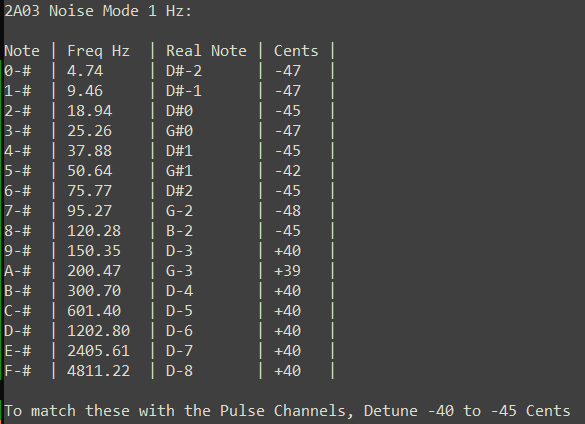
Here's something fun you can try, the noise channel can produce tone (but you probably already knew that), overclocking is another way you can produce tone though. Here is a list of the default tones the noise channel produces via a pwm effect (V01).
Default metal noise tends to be kind of hard to mesh with the overclocked pitches, but you can still fit them together with some effort. Now for the fun part, by using a looped volume envelope we can produce new/different tones (works best in metal mode) let's crank up that refresh rate to 330 (E). Assumming we just want the most useful notes steps 2 - 9 provide the following notes:
Step: 2 = 165.00 Hz, E-3, +2
Step: 3 = 110.00 Hz, A-2, +0
Step: 4 = 82.50 Hz, E-2, +2
Step: 5 = 66.00 Hz, C-2, +16
Step: 6 = 55.00 Hz, A-1, +0
Step: 7 = 47.14 Hz, F#1, +33
Step: 8 = 41.25 Hz, E-1, +2
Step: 9 = 36.67 Hz, D-1, -2
(Thanks to orjis for the calculator)
Using this as a reference I was able to make this short demo track using noise only
You're pretty limited using noise only, but using the noise channel can be a fun thing to experiment with, if your volume envelope is more like (1 1 1 0) instead of (1 0 0 0) you can get the noise channel to sound a lot like an electric guitar, this can be a good way to mix the metal mode sounds with your overclocked ones since
you get both pitches at the same time. In fuller mixes, this method of getting pitches from the noise channel is best for bass sounds since famitracker only supports up to 400hz (technically 800 if you import a text file set to 800hz) the highest note you can get with this method is a G-3 (392 hz).
 Home
Home
 About
About
 Projects
 Blog
Blog
 Music
Music